If you are looking to start or advance your career in Cloud Computing, DevOps, or Software Engineering, learning Amazon Web Services (AWS) is one of the most high-value decisions you can make. AWS controls the largest market share in cloud computing, powering millions of enterprise applications worldwide.
In this comprehensive 11-step visual guide, we break down the entire AWS learning path—from absolute beginner foundations to advanced container orchestration, CI/CD automation, security, and cost optimization. Follow this roadmap step by step to build industry-ready cloud skills!
Why Learn AWS in 2026?
Amazon Web Services offers over 200 fully featured services. Following a structured roadmap ensures you focus on the right core services:
- High Market Demand: AWS is the leading cloud provider used by startups to Fortune 500 enterprises.
- Core DevOps Integration: Native tools for Docker, Kubernetes (EKS), Infrastructure as Code (Terraform/CloudFormation), and CI/CD pipelines.
- Cost Efficient & Scalable: Pay only for what you use while scaling applications to millions of users globally.
- Hands-on Portfolio Projects: Build real-world web apps, microservices, and automated pipelines.
"Build in the Cloud, Scale with Confidence, Deploy with Speed."
Prerequisites
Before diving into the AWS Roadmap, it is helpful to have basic familiarity with:
- Basic understanding of Linux terminal commands (SSH, file permissions)
- Fundamental networking concepts (IP addresses, Ports, HTTP/HTTPS, DNS)
- A Google or personal email account to set up your AWS Free Tier Account
- A valid Debit/Credit card for AWS identity verification
Step-by-Step: AWS Complete Learning Roadmap
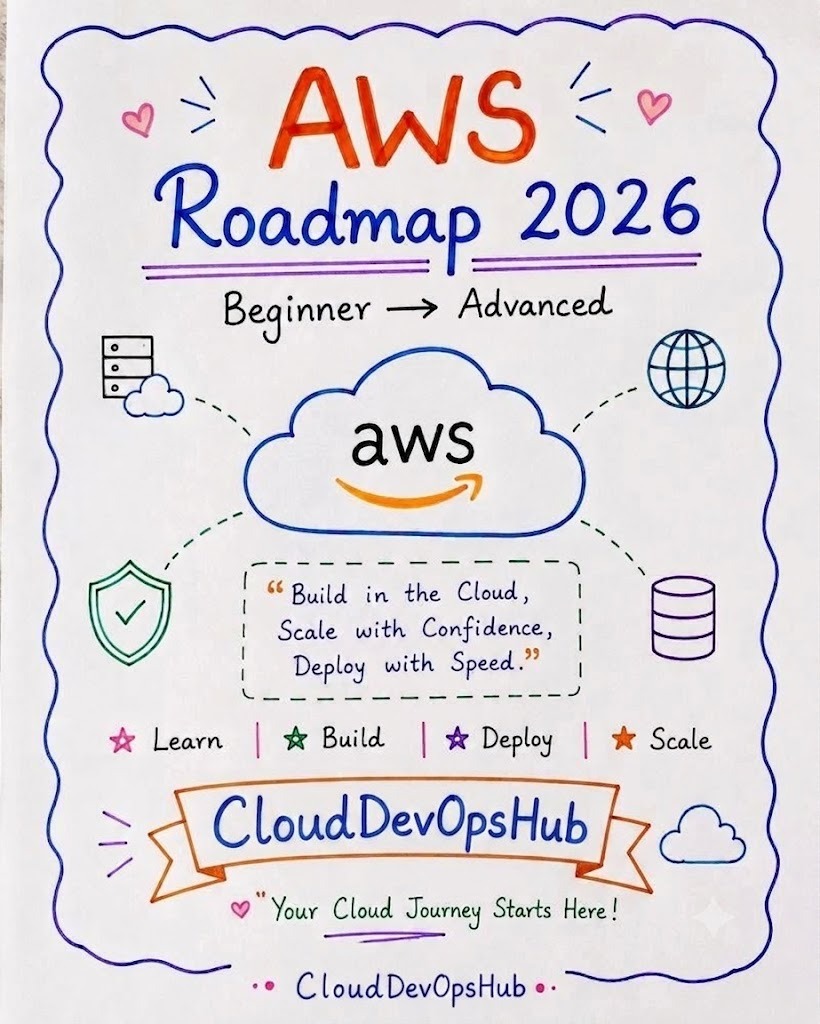
1 AWS Roadmap 2026 Overview
The roadmap is structured into 4 key learning phases: Learn → Build → Deploy → Scale.
- Learn: Master core cloud foundations, IAM permissions, billing, and global infrastructure.
- Build: Launch EC2 instances, configure S3 storage buckets, setup VPC networks, and create RDS databases.
- Deploy: Package apps with Docker, push images to Amazon ECR, and deploy on ECS / EKS / Fargate with CI/CD.
- Scale: Implement Auto Scaling, Elastic Load Balancing, CloudWatch monitoring, and multi-AZ high availability.
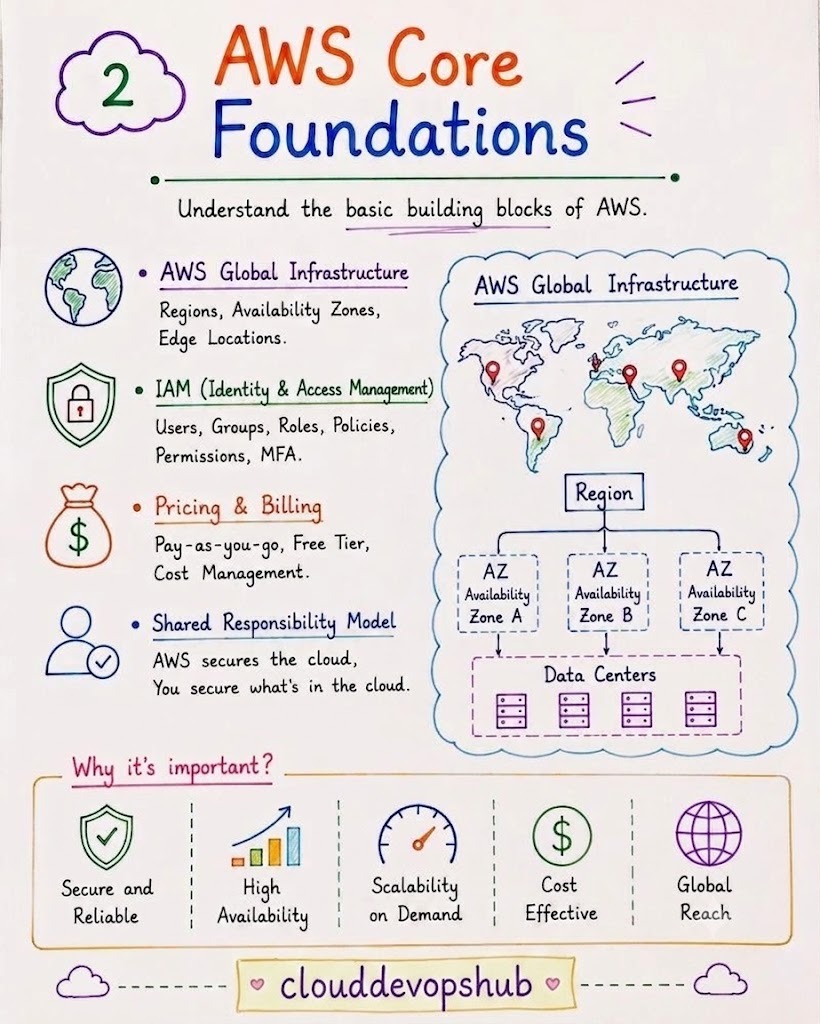
2 AWS Core Foundations
Understand the basic building blocks of Amazon Web Services before creating your first resource:
- AWS Global Infrastructure: Regions (geographical data center locations), Availability Zones (AZs) (isolated data centers with redundant power and networking), and Edge Locations (CloudFront CDN points of presence).
- IAM (Identity & Access Management): Manage Users, Groups, Roles, JSON Permission Policies, and enforce Multi-Factor Authentication (MFA).
- Pricing & Billing: Learn Pay-as-you-go pricing, Free Tier limits, and cost tracking.
- Shared Responsibility Model: AWS secures the physical infrastructure and virtualization layer ("Security OF the cloud"), while you secure your data, OS patches, and firewall rules ("Security IN the cloud").
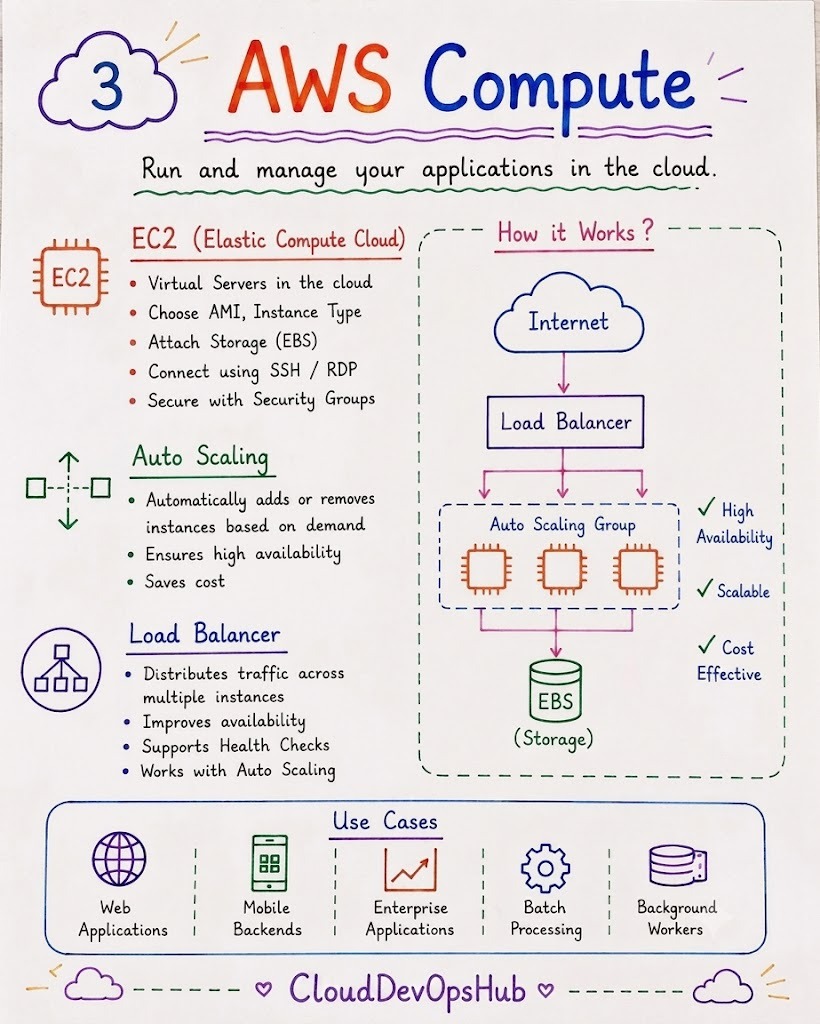
3 AWS Compute Services
Run and manage scalable virtual servers and compute workloads in the cloud:
- Amazon EC2 (Elastic Compute Cloud): Provision virtual machines in minutes. Select AMIs (Operating System images), Instance Types (t3.micro, c6i), attach EBS storage, and secure access with Security Groups.
- Auto Scaling: Automatically launch or terminate EC2 instances based on real-time traffic demand (CPU/memory thresholds) to maintain high availability and optimize costs.
- Load Balancers (ELB/ALB): Distribute incoming web traffic evenly across multiple EC2 instances, perform health checks, and handle SSL termination.
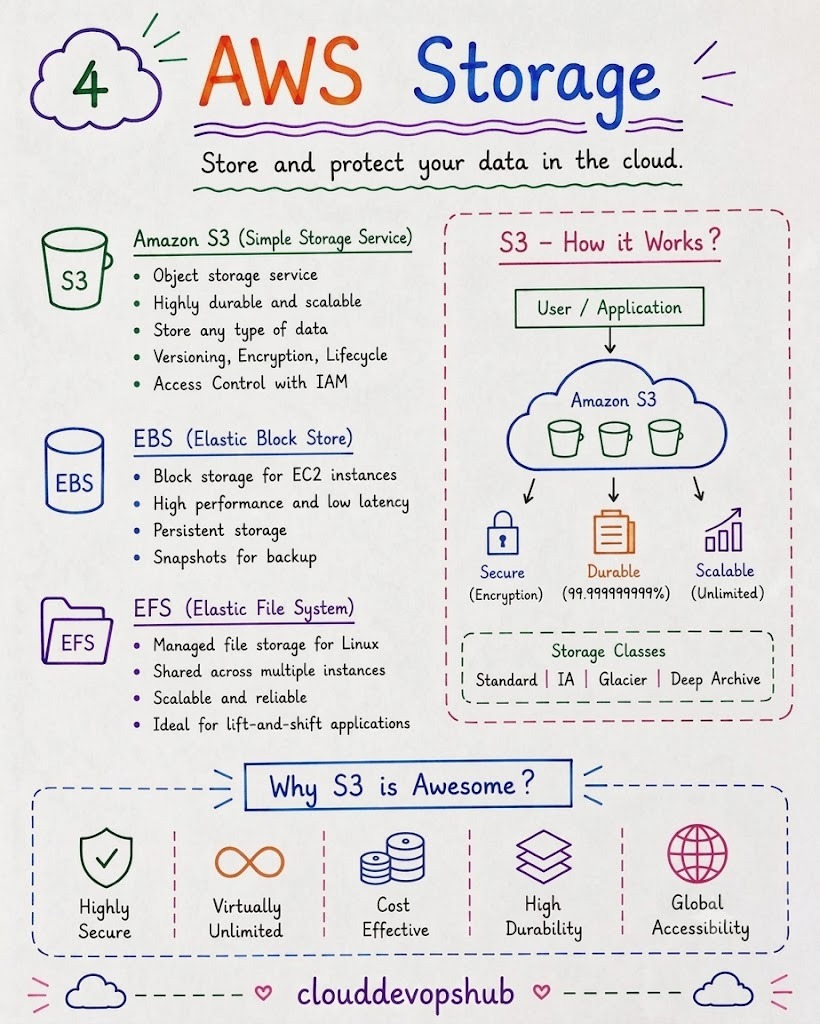
4 AWS Storage Services
Store, protect, and manage object, block, and shared file system data:
- Amazon S3 (Simple Storage Service): Highly durable (99.999999999% 11 9's) object storage service for files, images, videos, and backups. Features lifecycle rules, bucket policies, and versioning.
- Storage Classes: S3 Standard, Intelligent-Tiering, Standard-IA, Glacier, and Deep Archive.
- EBS (Elastic Block Store): Persistent, high-performance block storage attached to single EC2 instances (acts as virtual hard drives).
- EFS (Elastic File System): Fully managed NFS file storage shared across multiple Linux EC2 instances concurrently.
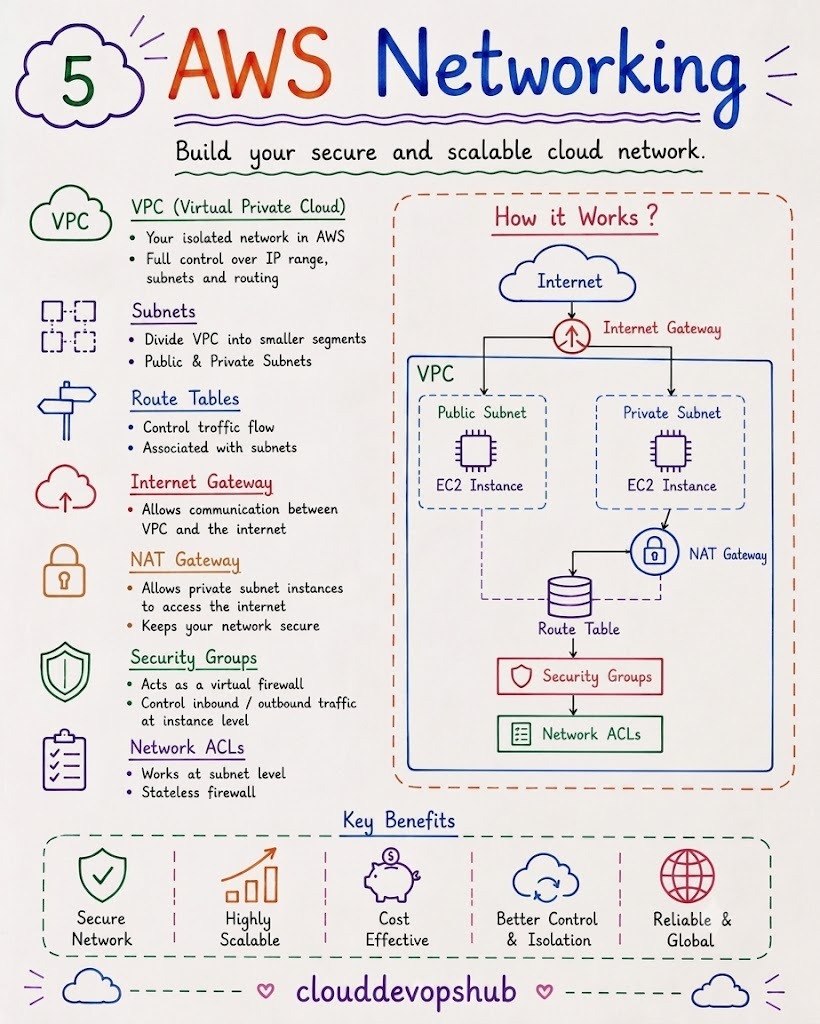
5 AWS Networking (VPC)
Build an isolated, custom virtual network in the cloud with complete control over traffic flow:
- VPC (Virtual Private Cloud): Your private network logically isolated within your AWS account.
- Subnets: Divide VPC into Public Subnets (Internet-facing) and Private Subnets (internal app/database servers).
- Route Tables & Gateways: Use Internet Gateways (IGW) for public access and NAT Gateways to give private subnet instances safe outbound internet access.
- Firewall Protection: Security Groups (stateful firewall at instance level) and Network ACLs (stateless firewall at subnet level).
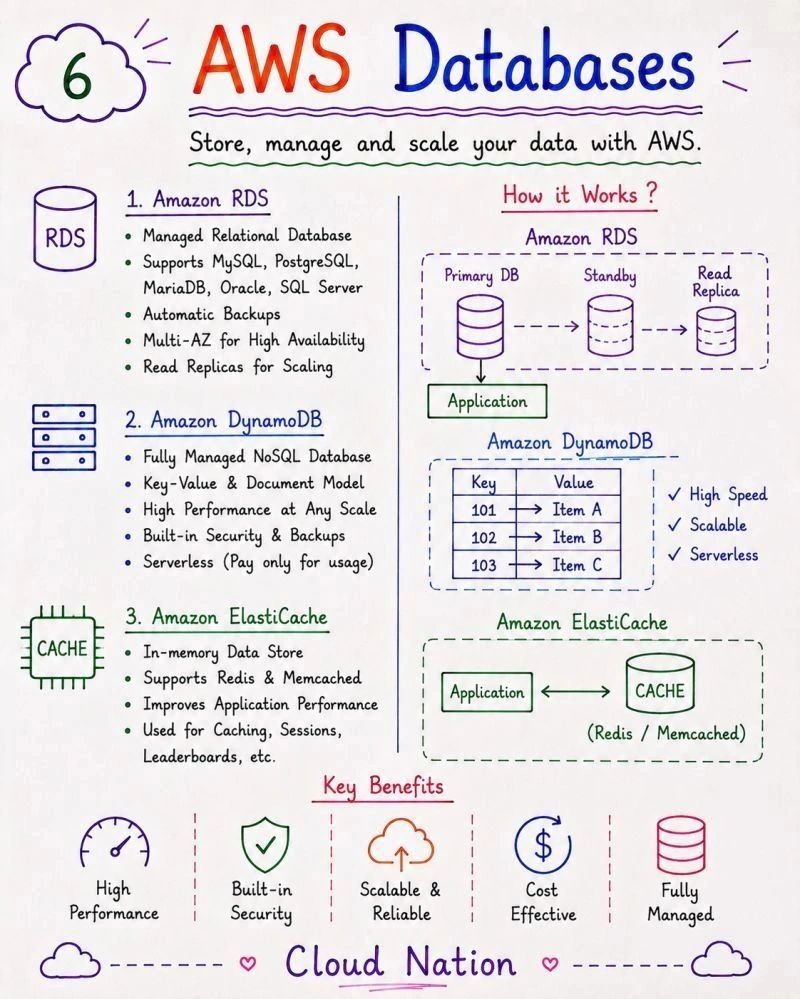
6 AWS Database Services
Store, manage, and scale relational, NoSQL, and in-memory databases with automated backups:
- Amazon RDS (Relational Database Service): Managed SQL databases supporting MySQL, PostgreSQL, MariaDB, Oracle, and SQL Server. Features Multi-AZ synchronous replication for zero-downtime failover and Read Replicas for scaling.
- Amazon DynamoDB: Fully managed, serverless NoSQL key-value and document database delivering single-digit millisecond latency at any scale.
- Amazon ElastiCache: In-memory caching service (Redis & Memcached) to accelerate application performance and manage user sessions.
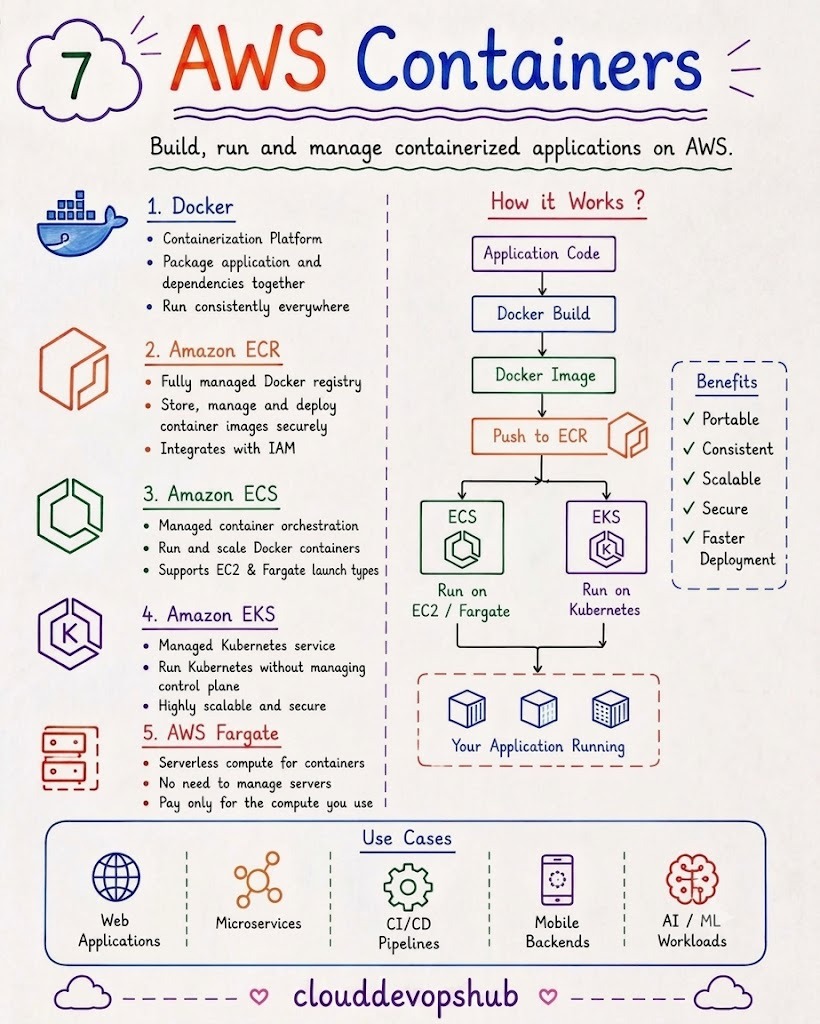
7 AWS Containers & Microservices
Package, deploy, and orchestrate containerized applications seamlessly on AWS:
- Docker: Containerization standard packaging code and dependencies into lightweight containers.
- Amazon ECR (Elastic Container Registry): Secure, fully managed private Docker container registry.
- Amazon ECS (Elastic Container Service): AWS-native container orchestration service for running Docker clusters.
- Amazon EKS (Elastic Kubernetes Service): Managed Kubernetes service running Kubernetes control planes automatically.
- AWS Fargate: Serverless compute engine for ECS and EKS—run containers without managing EC2 servers.
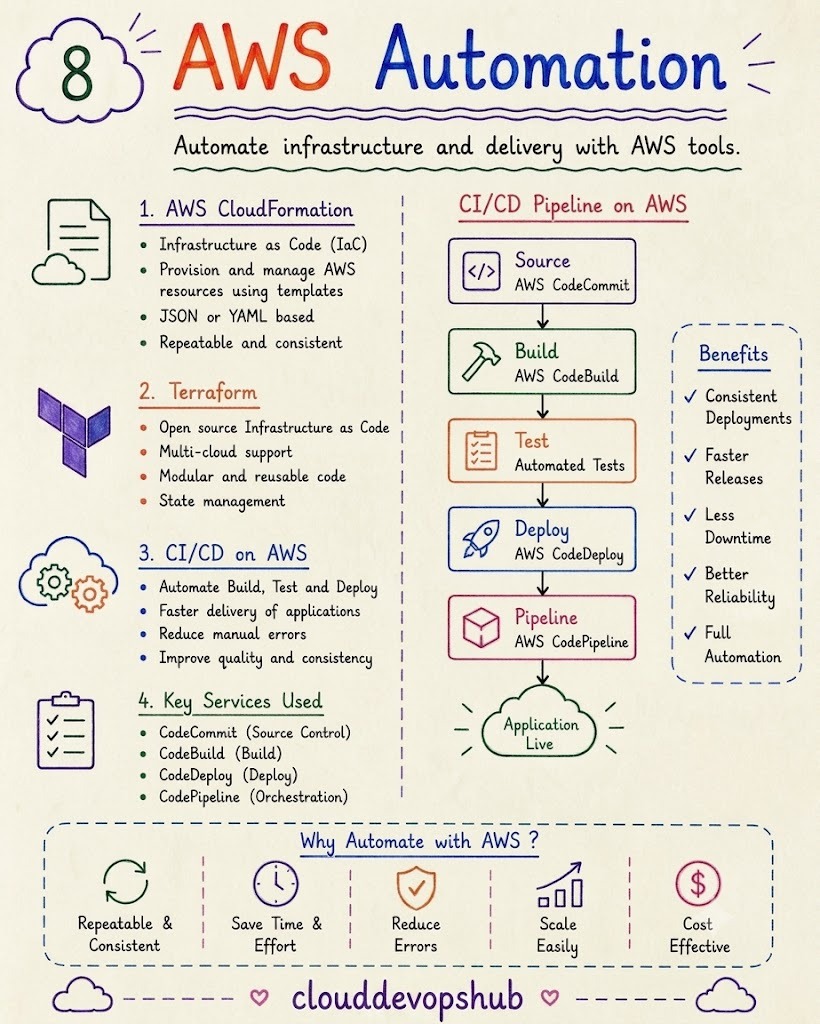
8 AWS Automation & DevOps
Automate infrastructure provisioning and deliver applications continuously with CI/CD tools:
- Infrastructure as Code (IaC): Define cloud resources in code using AWS CloudFormation (JSON/YAML) or Terraform (HashiCorp declarative HCL).
- AWS DevOps CI/CD Suite:
- CodeCommit: Git-based secure source control repository.
- CodeBuild: Automated build and testing service.
- CodeDeploy: Automated application deployment service.
- CodePipeline: End-to-end continuous integration and deployment orchestration pipeline.
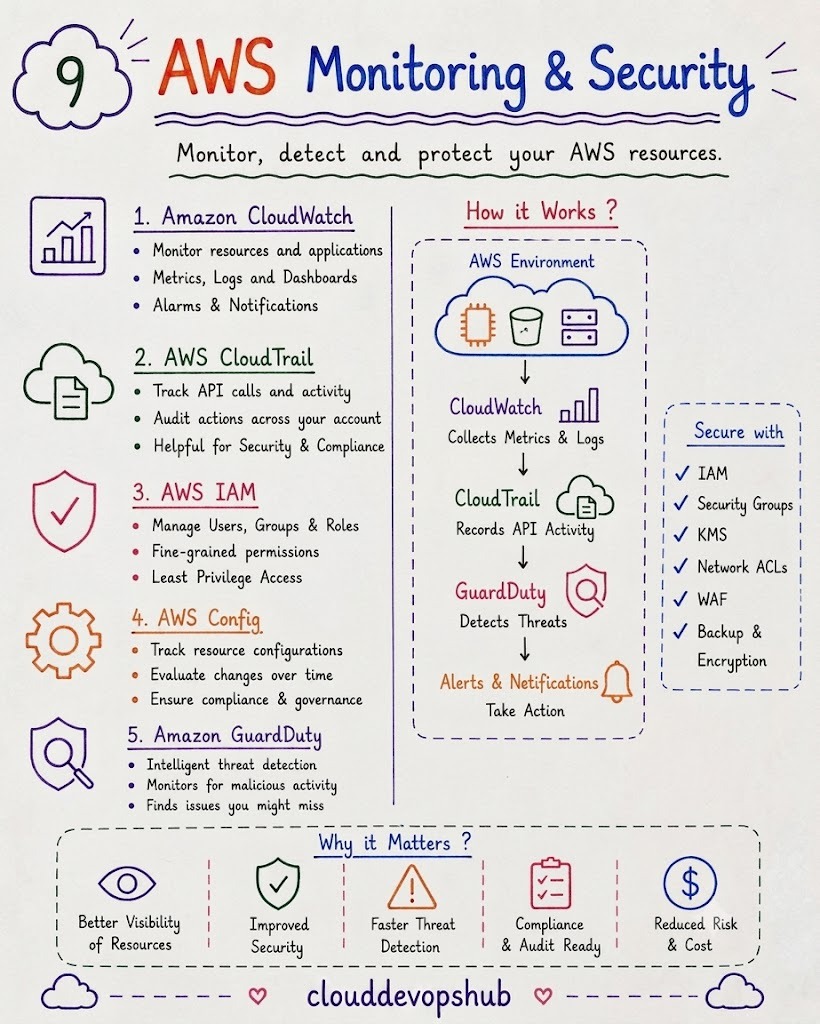
9 AWS Security, Monitoring & Governance
Monitor system metrics, aggregate logs, track API calls, and enforce compliance:
- Amazon CloudWatch: Collect metrics, monitor CPU/memory performance, view log groups, set up dashboards, and trigger alarms.
- AWS CloudTrail: Audit and log every API call made across your AWS account for security compliance.
- AWS Config: Track resource configuration history and evaluate compliance rules over time.
- Amazon GuardDuty: Intelligent threat detection using machine learning to monitor malicious behavior and unauthorized access.
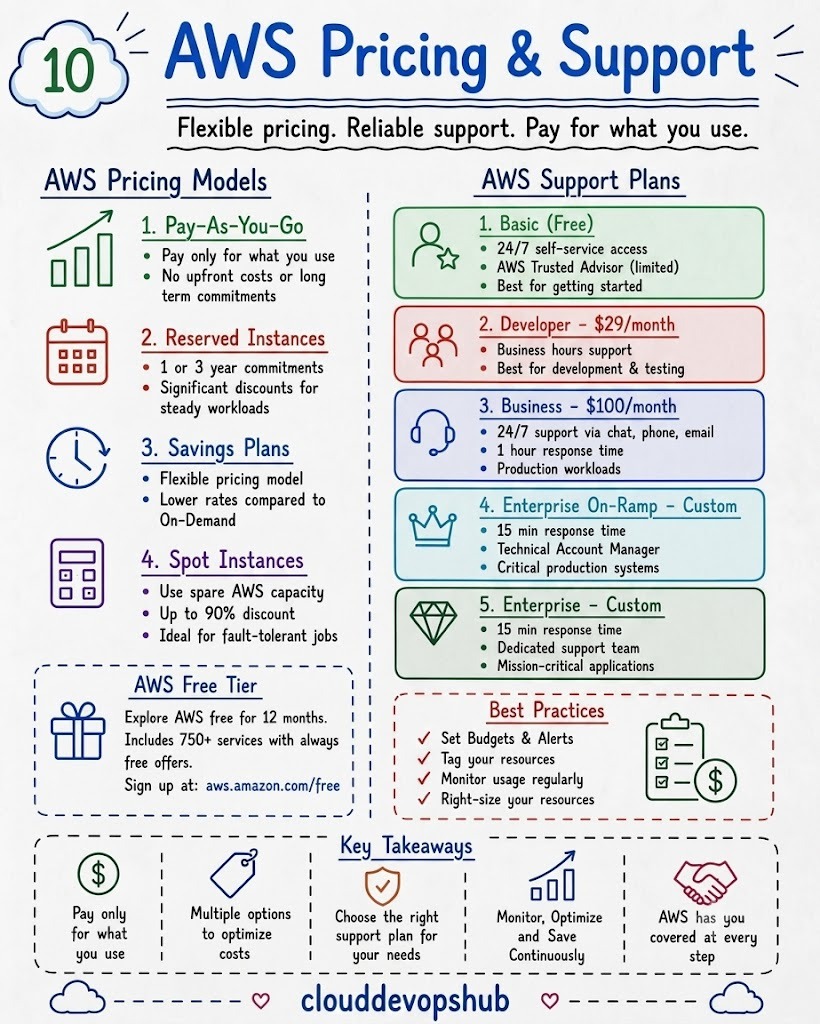
10 AWS Pricing Models & Support Plans
Optimize cloud costs and choose the right support plan for production requirements:
- Pricing Models:
- Pay-As-You-Go: On-demand pricing with no long-term commitment.
- Reserved Instances (RI): 1 or 3-year commitment saving up to 72%.
- Savings Plans: Flexible hourly spend commitment across compute services.
- Spot Instances: Spare AWS capacity at up to 90% discount for fault-tolerant batch workloads.
- AWS Free Tier: 12 Months Free + Always Free offers (750 EC2 hours/month, 5GB S3 storage).
- AWS Support Plans: Basic (Free), Developer ($29/mo), Business ($100/mo), and Enterprise On-Ramp/Enterprise (Custom dedicated support).
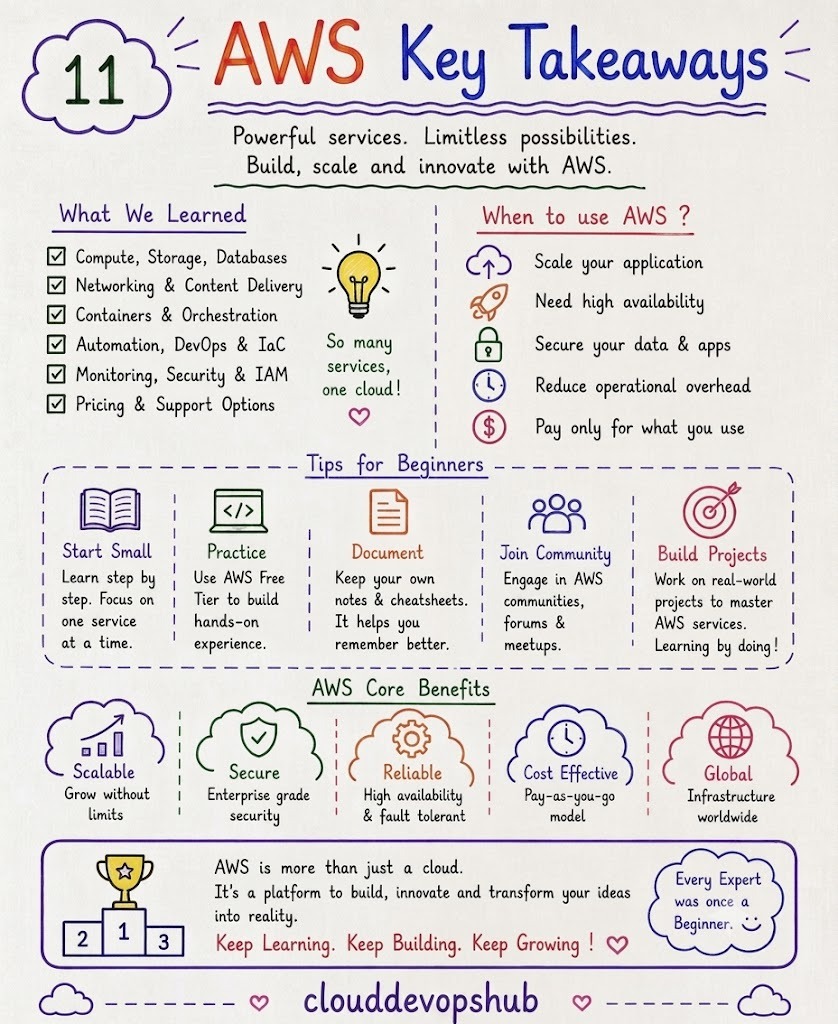
11 AWS Key Takeaways & Next Steps
Review the main takeaways and actionable advice to accelerate your cloud learning journey:
- Start Small: Learn step by step. Focus on one service at a time (e.g., Master EC2 & S3 before jumping to Kubernetes).
- Practice Hands-on: Use the AWS Free Tier to deploy real projects and gain practical experience.
- Document Your Work: Maintain cheat sheets, write technical blogs, and share your projects on GitHub.
- Join Cloud Communities: Participate in AWS User Groups, forums, and DevOps meetups.
- Build Real-World Projects: Build 2–3 full-stack portfolio applications showcasing VPC, Docker, RDS, and CI/CD pipelines.
What to Do Right After Setup
Once your AWS Free Tier account is active, take these immediate steps to ensure a secure and organized environment:
- Enable Multi-Factor Authentication (MFA) on your AWS Root Account immediately.
- Create an IAM Admin User and avoid logging in with the Root account for daily tasks.
- Set up AWS Budgets & Billing Alerts (e.g., set an alert at $5 or $10) to avoid accidental charges.
- Explore the AWS Console and launch your first t3.micro EC2 instance.
Important Best Practices for Cloud Beginners
- Always Set Budget Alerts First: Navigate to Billing → Budgets and set up email notifications before spinning up resources.
- Terminate Unused Resources: Stop or terminate EC2 instances, NAT Gateways, and EKS clusters when you are done practicing for the day. NAT Gateways and EKS control planes incur hourly charges even when idle!
- Keep Your Access Keys Private: Never push AWS Access Keys (`AKIA...`) or secret keys to public GitHub repositories. Use IAM Roles or `.env` files.
- Stay Within Free Tier Limits: Keep track of your monthly hours and storage limits under Billing Dashboard → Free Tier.
👨💻
Vikas Ratnawat
From Cloud DevOps Hub